
I spend most of my time helping businesses figure out where AI actually belongs in their operations, which usually means workflows, automation, and the spaces between tools that nobody designed on purpose. Website redesign isn’t normally my focus. But a client conversation last week kept circling back to the same complaint – “our site looks like it’s from a different decade, and we don’t have the budget for a real redesign right now” – and I got curious whether an AI redesign tool could actually do something useful in that gap.
So I picked an old, fairly neglected small business site – outdated template, no mobile optimization to speak of, the kind of design that was probably fine in 2015 – and ran it through uKit AI to see what would actually happen.
Here’s what I noticed.
The setup was almost suspiciously simple
I gave it the URL. That was the entire input. No long brief, no answering twenty questions about brand values, no uploading a style guide. Just a link, and then a wait.
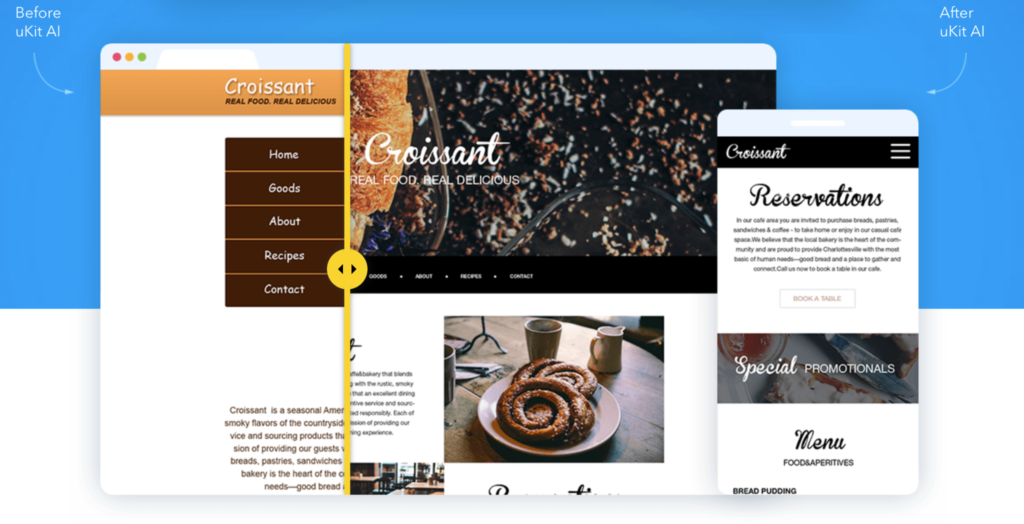
I’ll admit I expected the “waiting” part to be the catch – that ten minutes would really mean ten minutes if you got lucky, and longer otherwise. It wasn’t far off the stated time. The tool analyzed the existing site and came back with an upgraded version well within the window it promised.
What it clearly fixed on its own
The most obvious win was structural. The original site had the kind of layout problems that are invisible until you actually look for them: inconsistent spacing, a navigation menu that didn’t collapse properly on a smaller screen, no real mobile experience at all. The regenerated version handled all of that without me asking. Responsive layout, working navigation, an actual mobile view that didn’t feel like an afterthought.
It also picked up the basic technical items I’d expect a developer to handle in the first hour of any real redesign project: HTTPS, cleaner underlying markup, a layout that reads as current rather than dated. None of this is exciting to talk about, but it’s exactly the kind of unglamorous infrastructure work that businesses postpone because it’s tedious, not because it’s hard to understand the value of.
What it carried over, for better and worse
This is the part I found most interesting from a workflow perspective. The tool didn’t rewrite the business – it modernized the presentation of what was already there. The original content, service descriptions, and structure mostly carried through into the new version.
That’s a deliberate design choice, and I think it’s the right one for what this tool is trying to do. But it also means the redesign inherits whatever was already weak about the content. If the original “About” section was thin, the new one is a better-looking version of the same thin section. The AI didn’t add depth that wasn’t there to begin with, and I wouldn’t want it to guess at details about a real business it doesn’t actually know.
Where I had to step back in
A few things needed a human pass after the regeneration:
- The service descriptions were accurate but generic enough that they could have described several competitors in the same category. Nothing wrong, nothing distinctive either.
- A couple of details – a service area mention, a specific offering – needed checking against what the business actually does today, since the original site hadn’t been updated in a while and I wanted to be sure outdated information wasn’t just getting a fresh coat of paint.
- The overall structure was solid, but I still wanted to adjust the order of a couple of sections based on what I know about how this specific business’s customers actually decide to reach out.
None of this took long. But it confirmed something I already believed before I started this experiment: the tool handles the parts of a redesign that are genuinely mechanical – layout, responsiveness, technical hygiene – and leaves the parts that require knowing the actual business to the person who actually knows it.
How I’d actually use this in a real workflow
If I were advising a small business on this specific problem – old site, real budget constraints, no immediate plan for a full custom redesign – I’d suggest this as a legitimate first move, not a placeholder until “real” work happens later.
The way I’d frame it: let the AI handle the structural and technical refresh, then spend the time you saved doing the one thing the tool can’t do for you – checking that the content is current, accurate, and actually says something specific about why this business is the right choice. That’s maybe an hour of focused work instead of a multi-week project, which changes the calculation for a lot of businesses that have been putting this off indefinitely.
This lines up with something I keep coming back to in my own work: AI is most valuable when it removes the repetitive, mechanical part of a task and leaves the judgment part for a person who actually has the context to make it well. I wrote more generally about where that pattern shows up across different parts of a business in Where AI Creates the Most Value in a Small or Mid-Sized Business, and this redesign experiment is a pretty clean example of the same idea applied to something as ordinary as a website refresh.
This also connects to a point I made in How AI Integrations Can Save Businesses Time Without Disrupting Existing Workflows: the best AI additions don’t ask a business to change how it already works. uKit AI didn’t ask this business to adopt a new process. It just made one specific, recurring problem faster to deal with.
My honest takeaway
I went in expecting either a gimmick or a genuine shortcut, and it landed closer to the second one. uKit AI didn’t replace the thinking that goes into a real redesign. It removed the part of the process that was never really thinking in the first place – the layout fixes, the mobile responsiveness, the technical cleanup that every outdated site needs and almost nobody enjoys doing manually.
For a business stuck between “we know our site looks bad” and “we can’t justify a full redesign project right now,” that’s a genuinely useful gap to fill.